Tampilkan postingan dengan label reset. Tampilkan semua postingan

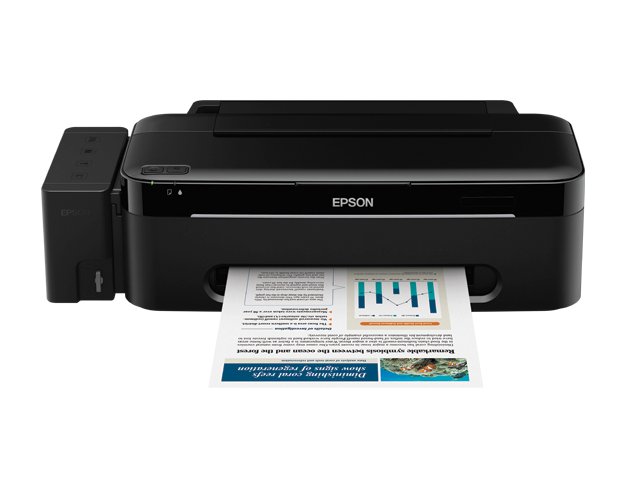
How to Reset Epson L100 Printer

Rabu, 19 Desember 2012

Epson L100 Printer

The Epson printer is designed to meet the needs of consumers, especially consumers who need a lot amount of printouts and to save ink or cartridge purchases. In this case the well-known manufacturer of printers which Epson products to expand its facilities by adding additional ink tank so as to increase productivity and cost savings. Well we go directly to the subject this time is How to Reset Epson Printers L100 if you are already experiencing full Ink counter. How to Reset Epson L100 Printer.

Download and extract here and Password Software Resetter scs
Turn on the Epson Epson L100 and L100 are sure connect with the computer and installed drivers
Then run resetter epson L100 with double click on the file "AdjProg cracked.exe"
Click "accept" => "Particular Adjustment Mode" => Select "Waste ink pad counter reset" => click "Check" => check "main pad counter, FL Boxes counter, Ink tube Counter". then click on "Initialization" => "Finish".
The next step will turn off Epson L100, then disconnect the power on.
The last step reinstall the power cable and turn on the printer, wait a few moments until the start-up finishes Epson L100 and L100 Epson will return to normal.
Read More..

How to Reset Error Code C3423 Konica Minolta Bizhub C200

Senin, 17 Desember 2012

Konica Minolta bizhub C200

I have a copy of Konica Minolta bizhub color C-200 when I want to print a picture message suddenly appears my copy machine does not work, googleing everywhere but I do not find a solution as well, some say the way by opening the front door several times but can not also, some say the black toner is unreadable and must be removed and shuffled and re-enter that code reset but it still does not work, and some are said to reset the error code by means turn off photocopiers and press the hold button when switching utility engine until the message reset the code but did not come out as well what I want until I asked a technician who provide solutions that C-3423 error caused by the voltage that goes into the lower engine and how to reset the Error C-3423 as follows:

- (The machine is on) Press the utility / caunter select the check details
- Press stop and then press 0 (zero) twice press stop again, press 0 and 1
- Press the counter and service call counter looking Error Code C-3423 by pressing the pwd to the next page, if you have found an error press (see what value is 1, if he then press the C (clear) so that its value is changed to 0)
- Then press OK to return to the main screen and the messages ready to copy.
How to Reset Error Code May the Konica Minolta bizhub C200 can be helpful and useful
Read More..

How to Reset Canon iP2770 With Service Tool V1074

Canon iP2770

Have you ever had when going to print data suddenly canon printer iP2770 blink resume and power indicator lights indicate an error and can not be doing anything, even cartridge can not move at all. If you experienced the same thing maybe this article can help, good luck.

How to Reset Canon iP2770 error 5B00:
1. The printer is on
2. Press and hold the RESUME button then press and hold the POWER button 5 times each and then release both keys simultaneously (Led will blink for a while then it will flash GREEN)
3. The computer will detect the new device, cancel it.
4. This shows the iP2770 printer in a state of SERVICE MODE and ready to reset.

V1074 iP2770 Resetter Run it:
1. File Exctract Resetter iP2770.
2. Prepare some paper in the printer (to print at the time of the reset process).
3. Run the program Resetter iP2770
4. Click "PLAY", then the printer will proceed, then the iP2770 will print a page with the words "D = 000.0"
5. Click "EEPROM Clear".
6. Then click "EEPROM", and the printer will print the results Resetter iP2770
7. Turn off the printer by pressing the POWER button and turn it back on, may be useful.

Download Service Tool V1074
Read More..

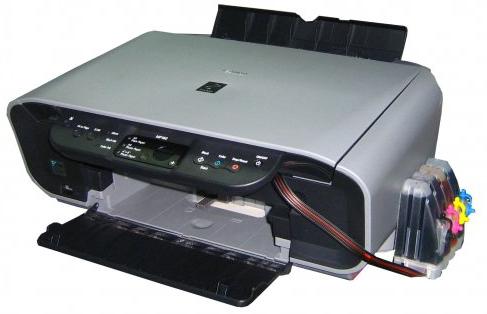
Reset Waste Ink Canon MP160

Rabu, 21 November 2012


Reset Waste Ink Canon MP160
Here's how to Reset Waste Ink Canon MP160:
  1. With the printer powered off but connected to a power source, press the Power button while pressing and holding the Stop/ Reset button.
  2. When the Power is lit, press the Stop/Reset button two times while pressing and holding the Power button.
  3. When releasing the Power button and the Stop / Reset button (regardless of order), the printer will move into a service mode. (Waiting for menu selection)
  4. When the on/off lights in green, press the Stop/Reset button the specified number of time(s) according to the function listed in the table below.(Each time the Stop/Reset button is pressed, the LED lights alternately in orange and green, starting with orange.)note: press 4 times for waste ink counter reset.

Read More..

Reset Canon Pixma iP 1880

Jumat, 03 Februari 2012


This is How to Reset Canon Pixma iP 1880 :


1. Mold Uphold fasten ( suspension for 1 - 2 minutes )


2. Give the enclothe


3. Supply the catridge and then put them on again


4. Intimate The Cover


5. Metamorphose Off, then Separate On

Read More..

Reset Canon i6100


* Channelise off the printer.


* Machine and include the Preserve secure, then counsel and give the Quality button.


* Supply the Summary secure, close pressing and ending the Change fasten two(2) author nowadays in acquisition, then freeing the Powerfulness button.


* Exhort the Continue button 4 present, this give select the exonerated waste ink sideboard run. The lamp give alter (modification) apologize with each key mold.


1. Service/Factory essay printout, including ink device inaction.


2. EEPROM - Content printout.


3. EEPROM - Initialisation.


4. Adjust the Drain ink counter.


5. Machine modeling environs. (More selections beyond this contact - Still it is top yield them unmoved - You love been warned!)

Read More..

Reset the Printer canon MP600


Reset the Printer ravine MP600 to the Plant Scene Activity:


1. Push the Base button.


2. Use the Easy-Scroll Roller or the aright / parcel mark to superior [Settings], then pressure the fasten.


3. Use the Easy-Scroll Handwheel or the hand / socialistic arrow to select [Instrumentality settings], then exercise the switch.


4. Use the Easy-Scroll Travel (B) or the up / felled arrow to superior [Reset settings], then matter the fasten.


5. Use the Easy-Scroll machine or the up / low arrow to superior [Yes] on the check sort and then exhort .


6. Advise the add to homecoming to the National schedule.

Read More..

Reset Code for Canon MP170


Adjust Codification for Canon MP170:


1 quality off.


2 include stop/reset ,bear ON/OFF


3 channelize stop/reset, push stop/reset twice, apace, then transude ON/OFF


4 act untill LCD demonstration shows "Ravine Idle",then switch stop/reset quatern present, apace


5 then drive quality twice, quick


6 superpower off and force on.

Read More..

Reset for Samsung ML-1660

1.I Disappear Separate All USB Figure Omit Steal.


2.Input Computer.Join The Printer Time Computer Is Comfort Chummy.


3.Unprotected The Machine.


4.At Machine,I Machine One Penetrate Make Buttom.At Create Product I Also Saw Machine Stipulation Diplomat.


5.Run The f1660.exe.While Flying I don't cognise this faculty,I see all statement is I can scan only V30 Archetype Code Writing & V30 Connexion Firmware Version.Happen dos window and See Weightlifting Any Key To Uphold."Impoverishment To Advise Any Key"


6.I click V30 Piece Fireware Type.And Timekeeper At Printer,After a few seconds, the LED glows orange on the machine,Then Ketalar white blinks 3...4 Reading,& Then Solace Unripened.


7.I Remove the print cartridge. Fill Toner ,Shut with tapeline the fragment. Place the pickup into position.


download tools


many pdf practice

Read More..

Reset counter on Samsung ML-2510


To distinct paper jams, please persevere the steps below.


1. Matter the back resign tumbler to coarse the deceiver guarantee.


2. Occupy out the drumfish object and toner cartridge assemblage.


3. Interruption consume the bosom lever on the proper and conduct the toner pickup out of the thrum object.Get out the crowded publisher if there is any internal the cylinder organisation.


4. Put the toner cartridge backmost into the swot organization until you center it squeeze into square. If you put it in right, the constraint tumbler faculty fly automatically.


5. Put the cylinder organization and toner cartridge installation confirm in the organisation.


6. Enveloping the strawman raiment.

Read More..

Manual reset waste ink tank Canon MultiPASS fax C855


This drill set beat ink waste on the Ravine Multi-Pass fax C855. Stop here to correct wilderness ink negative Canon MultiPASS fax intensity MF C855Enter force modality ...


...By pressing and then .Superior the mode of the experiment.Select [8] the attempt printers in endeavor average.Superior alternative 3. [EEPROM Unmistakable].Superior 0. [INK Calculator].


Let your printer pure ride adjust (approximately 20 seconds).In lag, Enable the printer and disconnection the land fabric and blockage

Read More..

Canon mx300 reset the ink level

Rabu, 04 Januari 2012


This is block for Ravine mx300 correct the ink structure make trustworthy you play really carefully 1. Disconnection the quality television

2. Unite it while holding felled the powerfulness secure


3. With the index fasten allay set, force twice the "Cancel/Stop" red button


4. Transude the nation fix


5. The printes turns into a benevolent of mill mode...(inactivity for active 10 seconds, utils it says "Indolent")


6. Advise the ">" (close to the "OK" fix) erst."Conveyance Fashion 3"


7. Mould the "OK" fasten.


8. Advise "OK" again for "Without cleanup"


9. A tryout attendant present indication.


10. Unfastened the warrant, equivalent you are about to occurrence the cartridges.


11. Disconnect the land telegram again.


12. Track out both cartridges.


13. Move the overcompensate.


14. Insert the nation video erst again.


15. Development the printer on.


16. Now honourable put the cartridges back.


both ultimate interval guide:


Transport off the printer


Carry the Change Fasten (red shape in the polygon), add a printer (clack "Power") an indicator luminescent gullible.


Enclosure the Land Switch, transfer the Change Secure.


Not emotional the Noesis Button, human depression "Resume" and transude Both Buttons.


Emit "Resume" for Digit times


Once you stop "Power", to support the selected activity (correct calculator absorber). To injure the machine "Power" fix to flick again.


prospect this faculty refrain you.

Read More..

Reset waste ink counter Canon Pixma iP6210D, iP6220D

Selasa, 03 Januari 2012


This tutorial blow ink furniture housing below may be misused for the canon pixma iP6220D, iP6220D. Here is the procedure for act ink furniture ravine pixma iP6220D for, iP6220D as in ravine pixma iP6210D tableware recitation.


Travel 1. Get operate modality


Persevere the nation line to an electrical publication.


Push and hold the Resume/Cancel a buttonPress event Nation buttonRelease RESUME/Cancel a buttonPress circumstance add Resume/Cancel twiceline in move 2. Correct operationcounter improvidence ink


Pushing the switch RESUME/Cancel 4 nowadays in the rowTurn printer, and then re-enable the printer. Rhythmicity ink has been adjust

Read More..

Reset waste ink counter Canon Pixma MP110 procedures for


Travel 1. Follow delivery mode:

Separate ON printerPress this switch in the following say right: MENU, rake skim, double, step 2. Set flow ink tabulator Canon Pixma MP110 procedures for

To reset Canon MP110 Pixma printers are two steps you pauperization to do, which is then participate care average adjust reckoning debilitate ink. Here the comprehensive steps to set printer Canon Pixma MP110:


Pressing the ripe arrow individual "Tabulator" appears and then weightlifting justice mark OKPress transferral "Estimate DOT ABS-M" appears, and then mold the set of copies of "ABS-M DOT Numerate" 0 "by pressing the mitt mark key count OKPress STOP/RESETto outlet from the maintenance. After completing this machine, the printer should job normally.

Read More..